WOLF-3476
Block Diagram
The block diagram shows an XMC compute/display module centered on the RTX A2000 (Ampere) GPU, highlighting the PCIe interface to the host and the multi-display output routing. It emphasizes the primary path of data arriving over PCIe for processing/encode/inference and being returned via display outputs or back to the host.
Overview
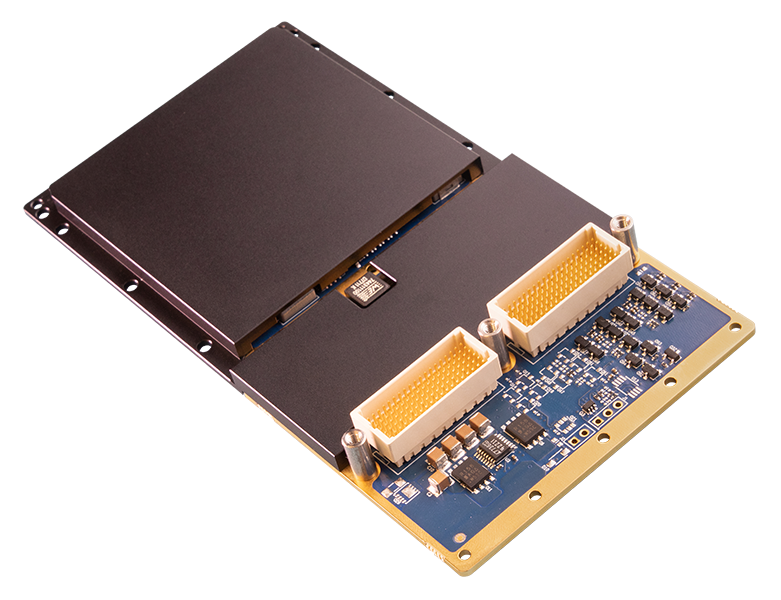
Embedded AI and Graphics with NVIDIA RTX A2000 XMC
This XMC module includes an advanced NVIDIA RTX A2000 embedded GPU. Data can be routed to the high-performance NVIDIA Ampere architecture GPU for processing, encoding, or AI inference, and then be output via DisplayPort, HDMI, DVI, or PCIe x8.
The NVIDIA Ampere architecture has introduced many significant improvements to the performance and efficiency of the GPU, with more flexible CUDA FP32/INT core use, more efficient third generation Tensor cores, and second generation RT cores. The Ampere GPU fabrication uses an 8nm manufacturing process providing significant power improvements which, along with other Ampere architecture improvements, can provide up to 144 GFLOPS/W, providing almost three times the performance per slot compared to the Pascal generation’s 51 GFLOPS/W.
Unlocking the best performance requires the best cooling capability. WOLF’s advanced cooling technology is designed to move heat using a low weight, high efficiency path to move heat away from the GPU.
Features
WOLF-3476 is a rugged XMC module that integrates an NVIDIA RTX A2000 embedded GPU to provide embedded graphics, encoding, and AI inference with up to 4 simultaneous video outputs. It supports DisplayPort, HDMI, and DVI output options and includes 8 GB GDDR6 128-bit memory. Host connectivity is provided over a PCIe Gen4 x8 interface.
GPU Features
- Up to 4 simultaneous video outputs:
- DisplayPort 1.4, up to 4K at 60Hz
- DVI and HDMI support
- Option for CC models: one VGA output
- Ampere GPU parallel processing support:
- CUDA Toolkit 11, CUDA Compute capability 8.6
- OpenCL 3.0, DirectX 12 Ultimate, OpenGL 4.6, OpenGL ES 3.2, Vulkan 1.2
- GPUDirect support
- 80 Tensor Cores (3rd Gen)
- NVENC (7th Gen) and NVDEC (5th Gen) with video encoding and hardware decoding support
Connectivity / System Management
- PCIe x8 GPU supports up to Gen4 when operating at 26W and up PCIe Gen4 requires CPU and motherboard with Gen4 support
- Linux and Windows drivers available
- NVIDIA driver support requires the following host CPU: Intel E/S/H/H35 Class, AMD H/HS Class
Mechanical / Open Systems Architecture
- Designed for Harsh Environments:
- Rugged conduction cooled (CC) or air cooled (AC)
- Operating temp: CC: - 40°C to +70°C standard, operational to +85°C AC: - 40° to +60°C standard, operational to +71C
- Vibration (sine wave): 10G peak, 5 - * Shock: 40G peak for CC, 30G peak for AC
- Dimensions (mm): CC: 74x143.75 AC: 74x149
- Weight: CC: 276g AC: 253g
- VITA 46.9 VPX I/O mapping patterns supported: X12d, X8d, X16s
Specifications
Key configuration and performance parameters for WOLF-3476 are summarized below for quick comparison. Values shown reflect the standard module configuration; contact WOLF if you need a tailored build or a specific payload profile.
Configuration Guide
The following table defines a series of common order codes for the XMC-A2000E-VO module. The asterisks denote characters of the part number that are defined based on common configuration options.
Some common configuration options for this module include:
- XMC 1.0, 2.0, or XMC+ (ANSI/VITA 88)
- Maximum power config
- Display interfaces
- Air or conduction cooled
- Conformal coatings
Example XMC-A2000E-VO configurations
Contact WOLF to determine the appropriate configuration for your system
Representative ordering numbers
| Part Number | Description |
|---|---|
| 347632-FZ011-000XMCvA0 | XMC 2.0, conduction cooled, Ampere A2000, PCIe Gen4 x8, rear: 2x DVI-D, 1x DP++, conformal coating 1B73 |
| 347631-F002-000XMCvA0 | XMC 1.0, conduction cooled, Ampere A2000, PCIe Gen4 x8, rear: 3x DP++ |
| 347622-F003-000XMCvA0 | XMC 2.0, air cooled, Ampere A2000, PCIe Gen4 x8, front: 1x DP++, 1x DVI-D, rear: 2x DP++ |
Related Products
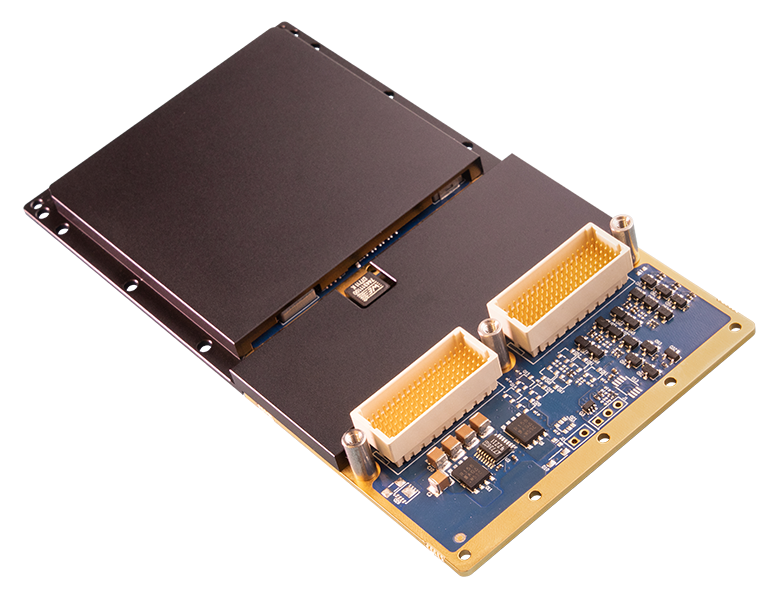
- NVIDIA RTX 2000 Ada (AD107)
- 3072 CUDA Cores, 96 Tensor Cores
- 8 GB GDDR6 VRAM
- PCIe Gen 3 x8
- N/A
- Module power 30–50 W
FAQ
Choose WOLF-3476 when your primary need is GPU compute plus native multi-display output from an XMC, and you do not need SDI/ARINC capture or conversion on the mezzanine.
This module is typically selected for:
- Embedded graphics, mission visualization, and GPU-accelerated encode/inference
- Systems that need up to four simultaneous video outputs (DP/HDMI/DVI options)
- Carrier designs that already have the required video routing/connectors mapped
If you need SDI/ARINC ingest or converted video outputs, an FGX/FGX2-based XMC is the better fit.
Confirm early how many outputs you truly need and how they are routed off the carrier:
- Supports up to 4 simultaneous video outputs
- Output interfaces are configurable (DisplayPort 1.4, HDMI, DVI), and some CC builds include an option for VGA
Because an XMC depends on carrier/front-panel mapping, lock the connector strategy early (rear/front, cable management, any transition cards) to avoid late mechanical and wiring changes.
Confirm these early for predictable bring-up:
- PCIe interface: Gen4 x8 is supported, but achieving Gen4 can depend on carrier and host CPU/motherboard support and operating conditions (power/thermal).
- Driver/OS fit: Linux and Windows drivers are supported; confirm your program OS baseline.
- Host CPU class requirement: the module notes NVIDIA driver support requires specific host CPU classes (Intel E/S/H/H35 or AMD H/HS class).
For many XMC programs, the highest risk is not the GPU—it is carrier PCIe capability and the platform CPU/BIOS baseline.
The most important ordering-time decisions are typically:
- XMC connector type: XMC 1.0 vs 2.0 vs XMC+ (VITA 88) for carrier compatibility.
- Thermal build: CC vs AC affects mechanical fit and sustained power.
- Display interface mix: DP-only vs DP with HDMI/DVI options (and VGA option on some CC builds).
- Power configuration (26W-50W envelope): align to carrier/chassis thermal headroom.
- Conformal coatings: drives environmental robustness.
Contact WOLF to determine the appropriate configuration for your system.