WOLF-3570
Block Diagram
The block diagram illustrates an XMC module combining an RTX 2000 Ada GPU with FGX2, emphasizing the capture/convert path for SDI-class inputs into GPU processing. It highlights the PCIe x8 interface to the carrier/host, the direct routing of converted video streams into the GPU pipeline, and the outbound routes for SDI and GPU-native display outputs.
Overview
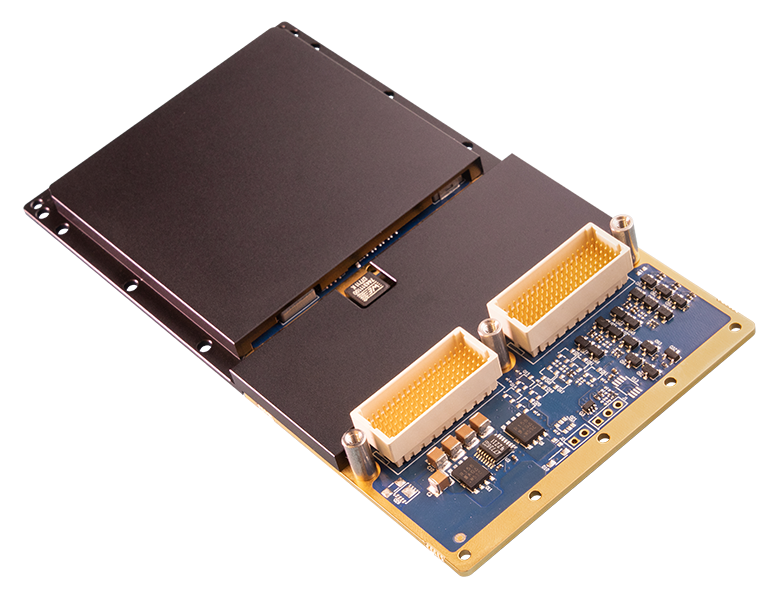
Embedded AI and 4K Video I/O with NVIDIA RTX 2000 Ada
This versatile I/O module includes both an advanced NVIDIA RTX 2000 Ada embedded GPU and WOLF’s Frame Grabber eXtreme (FGX2) with up to 4K support. The board accepts multiple simultaneous SDI inputs. The captured inputs can be routed to the high-performance NVIDIA GPU for processing and be output in several formats, including SDI, DisplayPort, HDMI, and others as MCOTS options.
The NVIDIA Ada architecture includes CUDA cores for HPEC, 4th generation Tensor cores for AI and data science computations, and 3rd generation Ray Tracing (RT) cores for visually accurate rendering. The Ada GPU uses a new TSMC 4N NVIDIA Custom Manufacturing Process which increases efficiency. The denser Ada GPUs have more CUDA and Tensor cores operating at higher clock frequencies at the same power, delivering significantly more performance per watt compared to WOLF’s previous generation product.
The WOLF Frame Grabber eXtreme (FGX2) provides the board with data conversion from one standard to another, with a wide array of video input and output options for both cutting-edge digital I/O and legacy analog I/O. The FGX2 supports NVIDIA GPUDirect which allows direct access to the GPU memory for processing and analysis.
WOLF’s advanced cooling technology is designed to move heat using a low weight, high efficiency path to conduct heat away from the GPU.
Features
WOLF-3570 is a rugged XMC I/O module that combines an NVIDIA RTX 2000 Ada embedded GPU with WOLF FGX2 frame grabbing and conversion to support low-latency video ingest, processing, and multi-format output workflows. It supports up to 4x SDI inputs and 4x SDI outputs, up to 2x DisplayPort/HDMI/DVI outputs, and configuration options for CVBS and analog audio inputs. The module includes 8 GB GDDR6 128-bit memory, a PCIe Gen3 switch with an x8 connection to the XMC connector.
GPU and FGX2 Features
- NVIDIA RTX 2000 Ada, 3072 CUDA cores, 96 Tensor cores, 24 RT cores
- Support for up to 12G-SDI
- MCOTS options for additional video format support, including ARINC 818 and CoaXPress
- WOLF FGX2 supports NVIDIA GPUDirect
- Ada GPU parallel processing support:
- CUDA Toolkit 12, CUDA Compute capability 8.9
- OpenCL 3.0, DirectX 12 Ultimate, OpenGL 4.6, OpenGL ES 3.2, Vulkan 1.2
- 8GB GDDR6 128-bit memory
- NVENC (8th Gen) and NVDEC (5th Gen) with up to 8K video encoding/decoding hardware support
Connectivity / System Management
- PCIe Gen3 switch with x8 to the XMC connector
- Linux and Windows drivers
- NVIDIA driver support requires the following host CPU: Intel E/S/H/H35 Class, AMD H/HS Class
Mechanical / Open Systems Architecture
- High level of ruggedization:
- Rugged conduction cooled (CC) or air cooled (AC)
- Operating temp: CC: - 40°C to +70°C standard, operational to +85°C AC: - 40° to +60°C standard, operational to +71C
- Vibration (sine wave): 10G peak, 5 - * Shock: 40G peak for conduction cooled, 30G peak for air cooled
- Dimensions (mm): CC: 143.75x74x13.5, AC: 161.95x74x13.5
- Weight (g): CC: 304, AC: 322
- VITA 46.9 VPX I/O mapping patterns supported: X12d, X8d, X16s
Specifications
Key configuration and performance parameters for WOLF-3570 are summarized below for quick comparison. Values shown reflect the standard module configuration; contact WOLF if you need a tailored build or a specific payload profile.
Configuration Guide
The following table defines a series of common order codes for the XMC-AD2000E-FGX2-IO module. The asterisks denote characters of the part number that are defined based on common configuration options.
Some common configuration options for this module include:
- Display interfaces
- Conformal coatings
- XMC 1.0, 2.0, or XMC+ connectors
- Air or conduction cooled
- Max power setting
- Analog audio inputs
XMC-AD2000E-FGX2-IO sample configurations
Contact WOLF to determine the appropriate configuration for your application
Representative ordering numbers
| Ordering Number | Description |
|---|---|
| 357032-F***-***vA0 | XMC 2.0, conduction cooled, Ada RTX2000, WOLF FGX2, rear: 2x 12G-SDI in, 2x 12G-SDI out, 2x DP out |
| 357022-F***-***vA0 | XMC 2.0, air cooled, Ada RTX2000, WOLF FGX2, front: 2x 3G-SDI in, 2x 3G-SDI out, 1x DP++ out, rear: 1x DP out |
| 357031-F***-***vA0 | XMC 1.0, conduction cooled, Ada RTX2000, WOLF FGX2, rear: 2x 3G-SDI in, 2x 3G-SDI out, 2x DVI out, 2x CVBS in |
Related Products
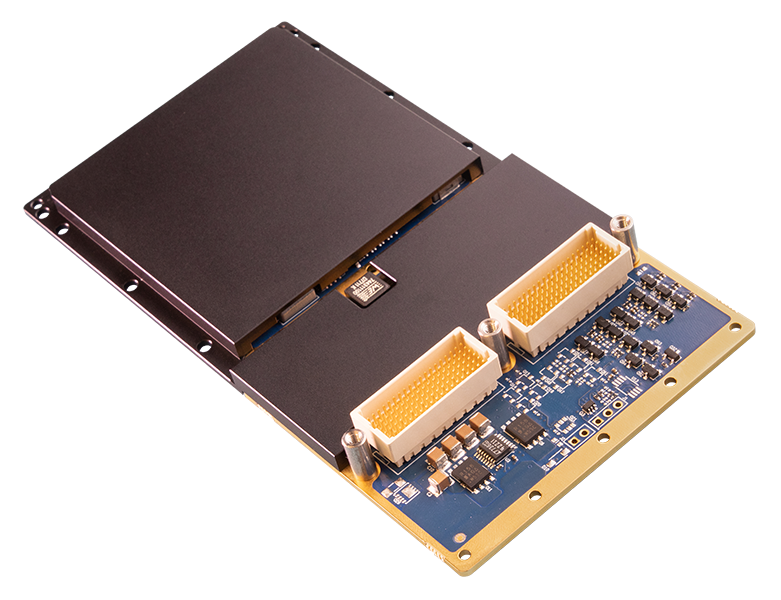
- NVIDIA RTX A2000E (GA107)
- 2560 CUDA Cores, 80 Tensor Cores
- 8 GB GDDR6 VRAM
- PCIe Gen 4 x8
- N/A
- Module power 26–50 W
FAQ
Choose WOLF-3570 when you need both: (1) an embedded NVIDIA GPU for AI/compute/encode, and (2) multi-channel video ingest and converted video egress on the same mezzanine.
This module is typically selected for:
- Low-latency ingest → GPU processing → output pipelines in one XMC slot
- Systems that need SDI-class I/O plus GPU acceleration without consuming additional carrier resources
- Architectures where minimizing host CPU involvement matters (FGX2 supports NVIDIA GPUDirect)
If you only need video capture/conversion, an FGX2-only XMC is usually simpler. If you only need GPU compute and native display, a GPU-only XMC is typically lower integration complexity.
WOLF-3570 is designed around a tight loop:
- FGX2 captures SDI-class inputs (up to 4K / 12G-SDI depending on configuration)
- Video can be routed directly into the GPU processing pipeline (FGX2 supports NVIDIA GPUDirect)
- Results can be delivered back out as SDI and/or GPU-native display formats (DP/HDMI/DVI by configuration)
This matters when you are trying to reduce latency and CPU overhead. A common architectural benefit is avoiding repeated host staging/copies in workflows such as real-time vision, enhancement, stabilization, or analytics.
Confirm these early because they drive whether the XMC will integrate cleanly on your carrier:
- PCIe to carrier: the module uses a PCIe Gen3 x8 connection to the XMC connector (via an onboard PCIe switch). Ensure your carrier exposes x8 lanes and supports the required Gen.
- I/O mapping pattern: supports VITA 46.9 VPX I/O mapping patterns X12d, X8d, X16s—confirm your carrier/front panel mapping matches the chosen configuration.
- Cooling style: available in conduction-cooled (CC) and air-cooled (AC) builds; mechanical envelope differs between CC and AC.
- Video I/O expectations: confirm required SDI input/output counts (up to 4 in / 4 out) and whether you need additional options such as CVBS or analog audio.
Treat carrier mapping + cooling selection as first-order design constraints for XMC integration.
Most ordering-time choices are integration-driven:
- XMC connector type: XMC 1.0 vs 2.0 vs XMC+ impacts carrier compatibility.
- Thermal build: CC vs AC affects chassis/mezzanine mechanics and allowable sustained power.
- Video interface mix: SDI channel count/speed (e.g., 3G vs 12G where applicable), DP/HDMI/DVI outputs, and MCOTS interface options (e.g., ARINC 818, CoaXPress).
- Power setting (30W-50W envelope): should be aligned to carrier and chassis thermal headroom.
- Conformal coating / variant locking / analog audio options: drives environmental robustness and configuration control.
Contact WOLF to determine the appropriate configuration for your application.